Accessing Exxforce Payroll
Log in process
This is the login
page, the first screen you see after opening the link. Simply enter your email
and password here to access the software.
Dashboard
page
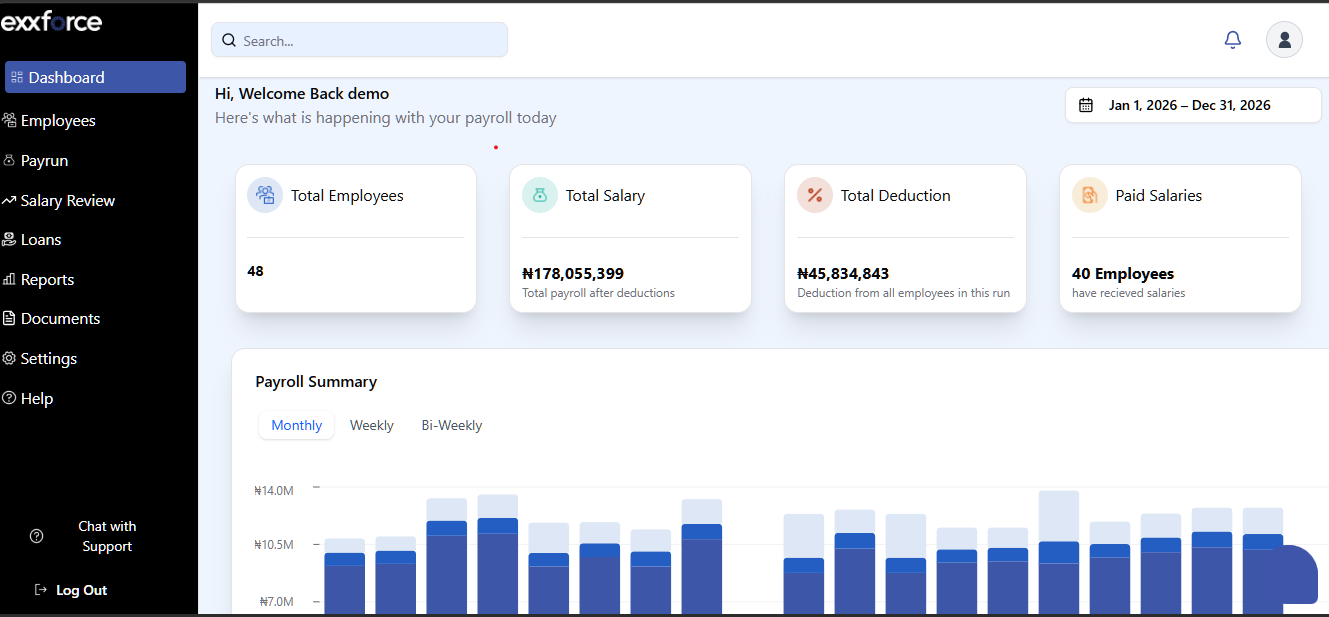
The Dashboard page is the first thing you’ll see when you log into your Exxforce Payroll account. It gives you an overview of all the payroll activities of your organization.
The Dashboard page is the first thing you’ll see when you log into your Exxforce Payroll account. It gives you an overview of all the payroll activities of your organization.
The
Home page has the following views:
Total Employees: The Total Employee
section shows you the total number of active employees in your organization.
Total Salary/ Paid Salary: View all the total amount paid after deductions and the number of employees paid this way you can keep track of your payroll expenses.
Total Deductions: This section gives you information on the total deductions from all employees in the run.
Quick Actions: Shortcuts to other modules
i.e. Employee, Payrun, Reports and Settings.
Payroll Cost Summary: This feature provides
a visual automated graphs that visually break down your spending into three
metrics.
- Net Pay: The total actual take-home pay distributed to employees.
- PAYE: The total tax amount remitted to the SIRS.
- Deductions: Any additional amounts taken from employee salaries after tax.
Note: You can instantly update these graphs by selecting specific timeframes—monthly, weekly, or bi-weekly—allowing for a precise view of your data over different periods.